
Cloud server
The Dungbeetle cloud server is an authenticated API with a server-rendered review UI, backed by SQLite (via the built-in node:sqlite, no native build), that lets teams run in CI and store results centrally without committing baselines to the repo. It's available as a managed service (currently in closed beta) or — for enterprise — self-hosted.
Nothing about authoring tests changes: you run dungbeetle test / ci exactly as before, then push the resulting report.
Node requirement
The server needs Node ≥ 22.5 for node:sqlite. On Node 22.x the engine is behind --experimental-sqlite (set by the start script); on Node 24 it works out of the box with an experimental warning.
Getting access
The Dungbeetle cloud is a managed service, currently in closed beta — we're busy with some testing, and access is limited to allowlisted email addresses. Request access and we'll notify you by email when your access is ready. Once your address is allowlisted, sign up (which creates your Personal team), then use New repository on the Repositories page (/ui/repos) for the active team to mint a client_id / client_secret pair for CI (the secret is shown once — copy it immediately).
To run the server on your own infrastructure instead, see Enterprise self-hosting — it's available to enterprise customers on request, not as a public self-serve deploy.
How auth works
Visitors sign up and sign in by themselves: email + password (with email verification and password reset) or OAuth — Google and GitHub — when those providers are configured (see Configuration). New email accounts can use Dungbeetle immediately and are nudged to verify; OAuth accounts are verified by the provider. Passwords are stretched with scrypt; only the hash is stored. The API-token path below remains for CI and operator/scripted access.
Under the hood it's a two-part model:
- A user API token (minted per user, stored as a SHA-256 hash) authenticates a person to the web UI.
- Repositories belong to a team (the billing account), and members of that team can access them — access is by team membership, not 1:1 user ownership. Creating a repository mints a
client_id/client_secretpair that CI uses to push (DUNGBEETLE_CLIENT_ID/DUNGBEETLE_CLIENT_SECRET). Everything a request can read or write is scoped to a repository. - AI agents (Claude Code, Cursor, Codex, Gemini CLI, the MCP server) don't get accounts or the CI pair — a human mints them a scoped agent token (
dbat_…) viadungbeetle login//ui/connect, bound to one repository and revocable at/ui/agents. See Agent authentication.
The web UI signs in by exchanging an API token for an opaque, expiring session (the token itself never enters the browser), enforces a strict nonce-based CSP, validates request origin on state-changing actions (CSRF), and throttles failed sign-in / API auth attempts.
Teams
A team is the unit that owns repositories and carries the plan and billing. Every user gets a Personal team on signup, and can create more. Every authenticated page carries a breadcrumb top-left in the header — the active team and, on repository pages, the repository, each segment with a switcher dropdown. The active team scopes what you see — the Repositories page (/ui/repos) lists that team's repositories and the Usage page (/ui/usage) shows that team's usage and plan.
Each team has its own page (the breadcrumb's team name, or Settings → Teams) tabbed like a repository: Team (recent activity, latest failures, and recent repositories with an add control), Repos (all of the team's repositories), Members (where owners and admins manage roles and invite people by email — the invitee accepts via an emailed link to join), Usage (the team's usage meters), and Settings (upload a logo, rename the team; an IP allow-list is coming soon). Switching and deleting stay on Settings → Teams; the Personal team can't be deleted, and a team must have no repositories before it can be.
Signing in lands on Home (/ui/home) — the active team's Team tab. Every other global destination lives in the header's avatar menu: Home, Repositories, Usage, Roadmap, and Docs, then Profile, Settings (/ui/settings, with Profile name/email, Account password / connected OAuth accounts / account deletion, Teams, and API tokens sections in a side-nav), and Sign out.
Push runs and baselines
Produce a report as usual, then upload it with the repository's credentials:
dungbeetle ci --config dungbeetle.config.json --json .dungbeetle/ci-report.json --json-only
DUNGBEETLE_CLIENT_ID=cid_… DUNGBEETLE_CLIENT_SECRET=csec_… \
  dungbeetle push --report .dungbeetle/ci-report.json --branch main --commit "$GIT_SHA"
Baselines can be versioned in the cloud instead of the repo:
DUNGBEETLE_CLIENT_ID=cid_… DUNGBEETLE_CLIENT_SECRET=csec_… \
  dungbeetle push-baselines --config dungbeetle.config.json
The server keeps a versioned history per (project, target): a new version is created only when the content digest changes; an unchanged re-upload is deduped and reports unchanged. --client-id and --client-secret may be passed as flags or via the DUNGBEETLE_* environment variables — or skip the pair entirely on a developer machine: after dungbeetle login both commands fall back to the stored agent token. Both commands target the hosted cloud by default. Self-hosting? Point the CLI at your server with --server <url> or DUNGBEETLE_SERVER_URL.
Review, approve, and promote
A server-rendered review UI ships with the server (no separate build step). Sign in at the server root with a user API token:
- Repository tabs — every repository is a tabbed page; the header shows the team / repo breadcrumb (each segment has a switcher dropdown): Repo (a state summary: pending/closed reviews, flakiest targets, run timeline), Runs, Analytics, and Settings (General / Tokens / Automation). Runs and Analytics carry a branch filter that defaults to the repository's configured default branch.
- Runs list shows a repository's recent runs with pass/fail, failure count, review state, and branch.
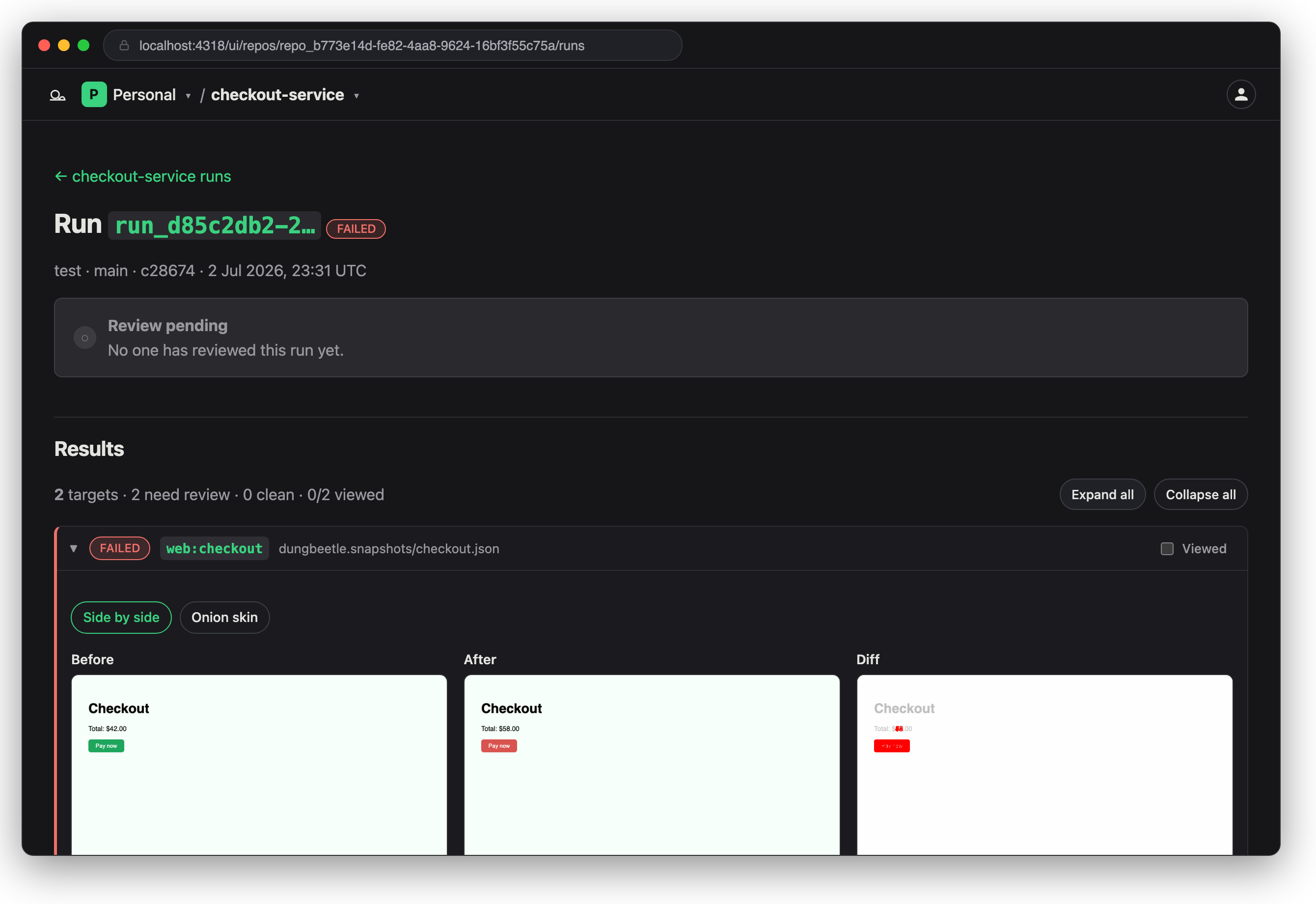
- Run detail reads like a pull-request review: a verdict header, each target's status and semantic diff, and the decisions as a timeline (the review form shows until you've decided).
- Review records an
approved/rejected/pendingdecision with a reviewer name and optional note — an append-only audit trail.
When a run is uploaded with candidate snapshots (dungbeetle test --with-snapshots / dungbeetle ci --with-snapshots, then dungbeetle push), approving can also promote them to new hosted baseline versions — so teams accept new baselines from the UI without touching the repo.
Analytics
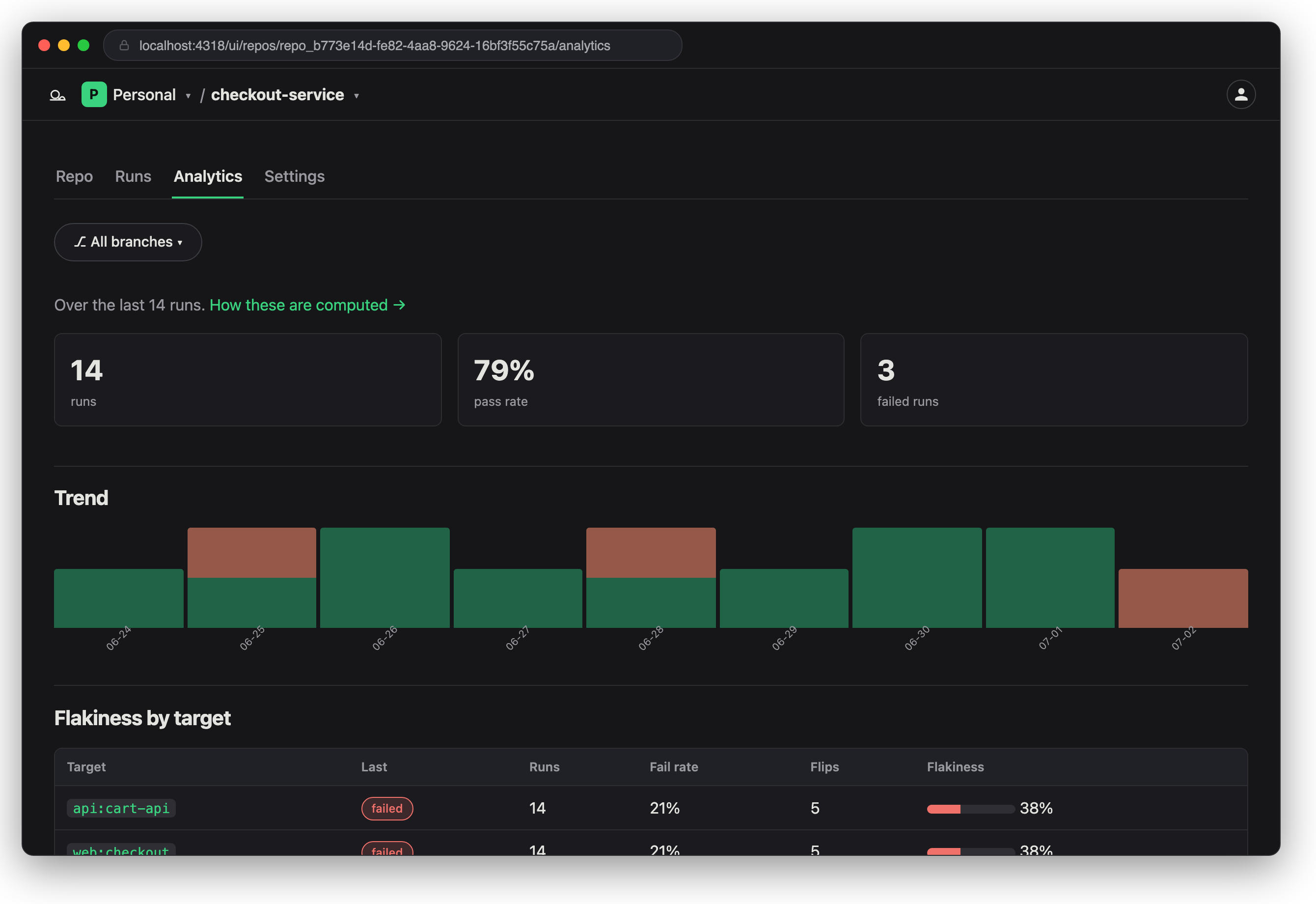
The server aggregates stored runs into project trends and per-target flakiness (a repository's Analytics tab), over a window of the most recent runs (default 200):
- Pass rate — passed runs / total runs in the window.
- Trend — runs and failed runs aggregated per day.
- Flakiness (per target) —
failRate,flips(pass↔fail transitions), andflakeRate=flips / (observations − 1), where0is perfectly stable and a value near1is the signature of a flaky target.
Roadmap & ranking
A public roadmap at /ui/roadmap lists what's being considered, ordered by community rank (1 = highest priority). The team sets a base priority; signed-in users reorder their own list with up/down controls, and those personal orderings aggregate into the community rank. Guests see the ranked list and a prompt to sign in. Paid users can additionally suggest new items (added as proposed for the community to rank).
Configuration
Using the managed cloud needs no server configuration — the CLI targets the hosted cloud by default and only needs DUNGBEETLE_CLIENT_ID and DUNGBEETLE_CLIENT_SECRET to push (see above).
Server deployment configuration — data directory, TLS, object storage (S3 / R2), at-rest encryption, SSO/OAuth providers, and request limits — is part of the enterprise self-hosting runbook, provided to self-host customers on request.
Security posture
- Transport. Client credentials and the session cookie are bearer secrets — run over TLS in production.
dungbeetle push/push-baselineswarn when they would send credentials to a non-loopbackhttp://URL. - Data at rest. The DB holds queryable metadata; larger content (run reports, baseline snapshots, screenshots) lives in on-disk blobs.
node:sqlitehas no built-in cipher, so encrypt the whole data volume at the host level (LUKS/dm-crypt or a KMS-backed cloud volume); optionally setDUNGBEETLE_ENCRYPTION_KEYto seal each blob with AES-256-GCM (backward-compatible with existing plaintext blobs). - Credential management. Mint additional API tokens (shown once, optional expiry), see last-used time, and revoke them under Settings → API tokens. Repository push tokens live under the repository's Settings → Tokens: mint labelled tokens (a label is required, expiry optional), rotate one in place (same
client_id, runs/baselines preserved), or remove it without touching the others. Agent tokens (scoped, one repository, minted via the device flow) are listed and revoked at/ui/agents. - Audit logging. Security-relevant events — sign-in success/failure, API auth failures and rate-limiting, repository create/delete, token mint/revoke, client-secret rotation, and review decisions — are emitted as structured JSON lines on stdout, identifying the actor and never logging secrets.
API surface (v1)
Full request/response shapes and status codes are in the Server API reference. This is the summary.
All /api/v1 routes accept HTTP Basic auth (the repository's client_id as username, client_secret as password — all-or-nothing, for CI) or a Bearer agent token (dbat_…, limited to its granted scopes). Either credential resolves to a repository, which scopes the request.
| Method | Path | Auth | Purpose |
|---|---|---|---|
| GET | /health | none | Liveness check |
| GET | /healthz | none | Readiness + version / uptime |
| POST | /api/v1/runs | Basic or Bearer | Ingest a run report |
| GET | /api/v1/runs | Basic or Bearer | List recent runs (agent discovery) |
| GET | /api/v1/runs/:id | Basic or Bearer | Fetch a stored run + report |
| POST | /api/v1/runs/:id/review | Basic or Bearer | Record a review (approve/reject/pending), optionally promoting candidates to baselines |
| GET | /api/v1/runs/:id/screenshots/:artifactId | Basic or Bearer | Fetch a content-addressed screenshot artifact (immutable) |
| POST | /api/v1/screenshots/probe | Basic or Bearer | Report which screenshot digests the server is missing |
| PUT | /api/v1/screenshots/:digest | Basic or Bearer | Upload a screenshot artifact (200 if deduped, 201 if new) |
| POST | /api/v1/baselines | Basic or Bearer | Upload a baseline (new version, or 200 if deduped) |
| GET | /api/v1/baselines | Basic or Bearer | List targets with their latest version |
| GET | /api/v1/baselines/:target | Basic or Bearer | Version history for a target |
| GET | /api/v1/baselines/:target/latest | Basic or Bearer | Latest version + snapshot |
| GET | /api/v1/baselines/:target/versions/:version | Basic or Bearer | A specific version + snapshot |
| GET | /api/v1/analytics | Basic or Bearer | Repository trend + per-target flakiness |
| GET | /api/v1/repository | Basic or Bearer | Identify the repository the credentials resolve to (for deep links) |
| GET | /api/v1/usage | Basic or Bearer | Current-period usage + plan limits for the repository's team (metering only) |
| DELETE | /api/v1/token | Bearer only | Self-revoke the presented agent token |
The run-ingestion payload is { report, branch?, commit? }, where report is the JSON report the CLI already writes. The repository is authoritative from the client credentials, so any report.project value is advisory.
Data model
Main SQLite tables: users, tokens, accounts (a team — its name, plan, and billing state), team_memberships (which users belong to a team, and their role), repositories (each carries an account_id tying it to its owning team), runs, run_results, and baselines (hosted baseline history — one immutable, monotonically versioned row per (repository_id, target_name, version) with a content digest). Screenshots are content-addressed: screenshot_artifacts holds one row per unique image (keyed by sha-256 digest) and run_screenshots links a run result to the artifacts it references. The database holds queryable metadata only; blobs live on disk under the data directory:
- Run reports:
<dataDir>/runs/<run-id>.json. Inline screenshots are offloaded to artifact blobs before the report is stored, leavingscreenshotRefs(digests) in the report. - Baselines:
<dataDir>/baselines/<repository-id>/<target>/v<version>/snapshot.json(andscreenshot.pngwhen present). - Screenshot artifacts:
<dataDir>/screenshots/<repository-id>/<artifactId>.png.